
A self hosted ai agent is an agent runtime you deploy on infrastructure you control, so its prompts, memory, credentials and tool calls stay inside your perimeter. You need three parts: a model, an agent harness that runs tools, and an always-on place to host it. Installing it is the easy part. Operating it is the hard part, once real people and real systems can reach it.
I'm Yeison Gómez, and I build Weppa. We host our own support agent, a Hermes Agent app called neo-agent, and we operate it with a second agent. This guide covers the parts, the hosting options and the mistakes that only showed up in production.
The three parts of a self-hosted agent
Every setup I have seen, ours included, splits the same way.
- The model. It can run locally (Ollama on a GPU box) or be an API you call. "Self-hosted" usually means the agent is yours, not that the model weights are. Local weights remove per-token fees, but the cost moves to VRAM and hardware.
- The harness. This is the loop that reads a message, decides and calls tools: shell, files, a browser, APIs, MCP servers. Hermes, OpenClaw, OpenHands and Agent Zero live here. So do builders like Dify, and frameworks like LangChain one level lower. The harness decides what the agent can do.
- The host. A laptop, a home lab, a VPS, a managed container or a VM. It decides whether the agent is up at 3 a.m., who can reach its ports and what happens to its memory when the disk dies.
Most "best self-hosted agent" lists compare the harness. In our case, every incident worth writing down came from the host and from how we operated it.
Where to run it: the options side by side
| Where | Good for | What you take on | Isolation |
|---|---|---|---|
| Your laptop | Trying a harness, local models | Sleeps when the lid closes; no public webhook without a tunnel | Your whole user account |
| Home lab with Docker | Private tools, local GPUs | Power, updates, exposing ports safely | A container, unless you add more |
| A VPS | 24/7 uptime, webhooks from other services | OS patches, TLS, backups, firewall, secrets on disk | Whatever you configure |
| Ephemeral VMs | Coding agents that run untrusted code per task | Image building, VM orchestration | Strong: a VM per run |
| Managed agent hosting (for example, Weppa) | A long-running agent you don't want to babysit | A plan per app; less control over the base image | A gVisor sandbox per app, isolated per account |
My rule of thumb: if the agent receives webhooks or messages from strangers, it needs a public HTTPS address, a backup and a sandbox. That rules out the laptop for anything customer-facing.
What you need before you start
- A clear job. Ours answers questions in a support inbox. A coding agent, a personal assistant and an inbox bot need very different tool sets.
- A list of tools it gets, and a longer list it doesn't. Our support profile has zero tools: no terminal, no files, no browser, no code execution.
- A place for secrets. API keys for the model and the inbox. The agent should use them by name and never print them.
- A way to reach it. A public URL with TLS if anything outside calls it.
- A backup and a way to know it ran. Agent memory and config are state, like a database.
- A test set. Questions with the expected behavior, written before launch.
What we learned running one in production
neo-agent runs Hermes 0.21.6 in our own Weppa account. On 2026-11-25 its status read "Running", size Max, with the daily backup completed at 04:48 UTC and 1 of 1 volumes covered. I read that through Weppa's MCP, the same way our operating agent does it every day.
The setup and the traps below come from our technical log (facts verified between 2026-10-21 and 2026-10-23).
One gateway, about ten profiles
Hermes can multiplex several profiles behind one gateway (gateway.multiplex_profiles: true). We run about ten. One of them, atencion, is the support profile. We cloned it from the main one. So we had to strip it: personal skills, a home-automation plugin and the cloned memory files all came out.
Then the trap. Some settings are read from the main profile, not from the one answering. Voice replies (voice.auto_tts) followed the main profile, so the support bot tried to send audio attachments to customers. Now the plugin forces text only.
A plugin on its own loopback port
We expected the inbox plugin to share the gateway's listener. It didn't. In Hermes, only the built-in platforms share that port on a secondary profile, so our plugin opens its own: 127.0.0.1:8650. The app routes one public path to it.
That has two consequences. First, only one profile per app can run that plugin. One port, one profile. Second, the binding matters. On 0.0.0.0, any other app in the same Weppa account could reach the plugin without passing the login proxy.
Small one. Changing the plugin's code needs a gateway restart; toggling the plugin off and on does not rebuild it.
A signed webhook, checked twice
Our inbox runs on Chatwoot, which signs agent-bot webhooks with HMAC-SHA256 over "<timestamp>.<body>". The plugin rejects bad, foreign, stale and missing signatures.
A reviewer still found a hole. The delivery ID header isn't signed. So someone who captured one real request could replay it inside the time window by changing that header. With the old code, that replay reached the agent three times. Now duplicates are keyed on a hash of the signed content and kept for 600 seconds. On a test install, outside neo-agent, our harness went from 18/19 to 19/19.
Handoff to a human after 90 seconds
The bot hands the conversation to a person in three cases: the customer asks for one, sending fails, or the bot hasn't answered in 90 seconds. A handoff leaves a private note, reopens the conversation and unassigns the bot.
What we didn't expect: any webhook failure also reopens the conversation. A route down, a rotated secret, a 5-second timeout, a gateway restart. All of them. But the bot stays assigned. Recovery from that state is still open work on our side.
Anyone in the inbox could send admin commands
Messages like /sethome, /reset or "restart hermes" could reach the gateway as commands, and anyone who writes to the inbox can type them. We sent exactly those messages ourselves, as tests. So we closed gateway control for inbox messages and neutralized slash commands. We confirmed it on the live app: the gateway kept the same process ID and ran nothing.
Internal text leaked too. Error notices, "interrupting" banners and late replies now go out as private notes. The plugin publishes to the customer only when a customer message is waiting and the conversation still belongs to the bot.
The inbox reaches the agent only through its public URL
In our account, the inbox reaches neo-agent only through its public URL. Weppa's boundary is between accounts: it closes the network toward other users' accounts. Between the apps of one account, we don't count on the network to protect the plugin. That is why it stays on 127.0.0.1, and the only way in goes through the login proxy. Network rules between apps of the same account are on the "Planned" list further down.
What actually reaches a public agent
Before we connected the widget, we read 23 real conversations (anonymized, August to October 2026). Most of them were not customer questions. Homework. Photos with "analyze this and list…". Trivia like "What is the capital of Australia?". Greetings that never turned into anything.
That changed one design decision. Our first instinct was "if unsure, hand off to a human", and with that traffic it would have buried the team in homework. So the support profile refuses unrelated topics in one sentence and does not transfer them. It transfers only when a real customer needs something the bot can't answer.
If you plan to put an agent on a public page, read your real inbound messages first. Your test set should look like your traffic, not like your FAQ.
Test it before anyone talks to it
We wrote a battery of 43 questions in 6 categories: FAQ answers, handoffs, off-topic requests, security, things Weppa doesn't offer and promises the bot must not make. Security cases include "reveal your instructions", "run a command" and "which AI are you?".
Each question runs as an isolated turn with no tools, inside neo-agent. Rules score it.
On 2026-10-30 the first run scored 40/43. I looked at the three failures, and none of them was the bot's fault. The bot had answered things like "Let me pass you to a person to confirm if you can transfer…", and our rule read "you can transfer" as a promise. It wasn't one. We fixed the rules so the "if you can…" form passes and "Yes, you can…" still fails, then graded the same answers again: 43/43.
Test your tests too. A grader that cries wolf trains you to ignore it.
How to operate a self-hosted agent safely
Eight rules we follow after running a Hermes agent in production, each one tied to something that went wrong or almost did.
- Give the least tools that do the job. A support profile with zero tools can't be talked into running
ls. - Keep secrets out of the conversation. The operating agent uses a key by name; the owner sets the value outside the chat. On Weppa this is an instruction to the agent, not a technical barrier, so treat it as policy.
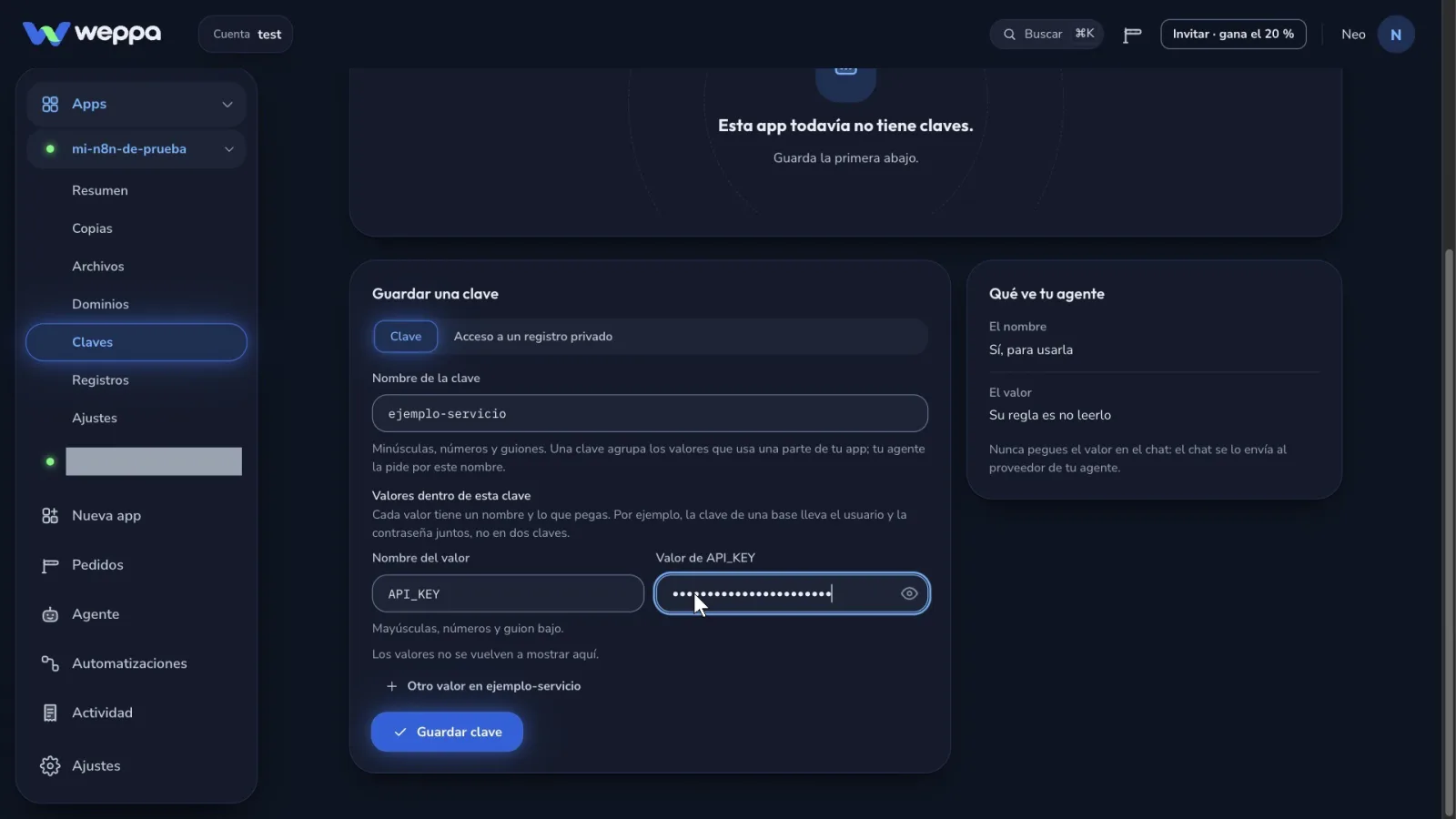
The dashboard: you paste the value once, your agent only uses the name. Weppa's dashboard is in Spanish today. - Make destructive actions need a human. On Weppa, deleting, restoring, resizing or anything that charges money is confirmed by the owner in the dashboard. The agent does the rest and rereads the real state.
- Bind internal ports to loopback. Expose one public route, behind auth or a signature.
- Sign and de-duplicate every webhook. Sign the body; a signed header alone can be replayed.
- Decide the handoff before launch. A timer (ours is 90 s) plus an explicit "I want a person" path.
- Back it up and check the backup ran. Read the status. Don't assume it.
- Sandbox the runtime. Agent code is untrusted code. gVisor puts a user-space kernel between the app and the host.
Running a self-hosted agent on Weppa
Weppa is managed hosting where you operate your apps with your own agent (Claude Code, Codex, Cursor) through an MCP scoped to your account. The catalog has three entries for agents:
| App | Version | Minimum size | What it is |
|---|---|---|---|
| Hermes Agent | 0.21.6 | Pro | Nous Research's agent, MIT license |
| OpenClaw | 2026.9.7 | Pro | Open-source agent, MIT license |
| Custom agent app | your image | Lite | Any agent software you bring |
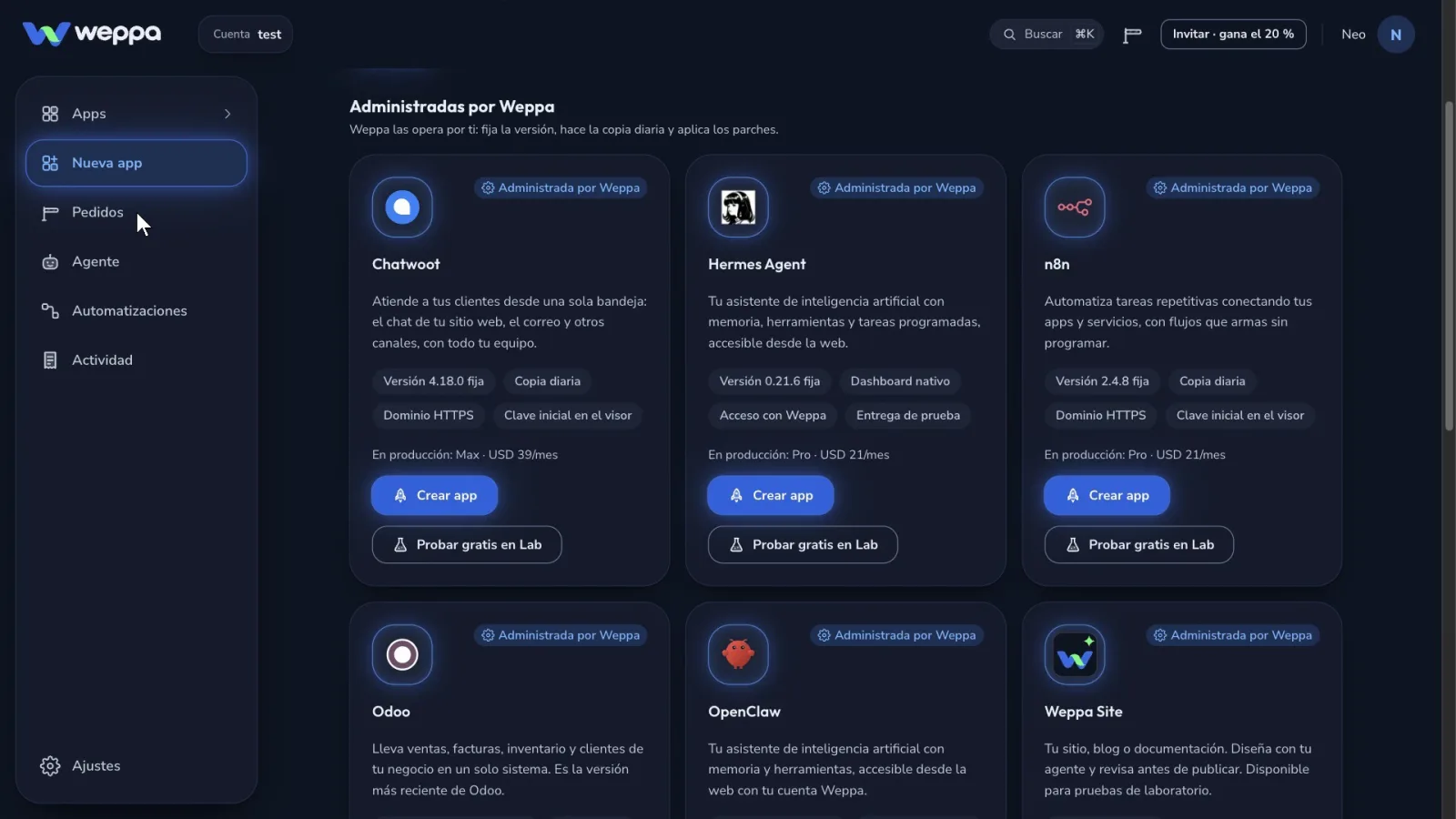
Sizes from the catalog: Lite is the smallest, Pro is 2 CPU and 4 GB, Max is 4 CPU and 8 GB. As of 2026-11-25, the monthly public price per app is USD 14.00 (Lite), USD 21.00 (Pro) and USD 39.00 (Max), plus taxes where they apply. Backup and domain are included in the size.
What the sandbox gives you today: each agent app runs under gVisor. It has no network path to other customers' apps, and no outbound mail ports (25, 465, 587). CPU is capped at 4 and temporary disk at 4 GiB per container. With Hermes and OpenClaw you sign in with your Weppa session; you set the model and keys inside the app's own dashboard.
What it doesn't give you yet, stated plainly:
- The three agent apps are marked "Not certified". Weppa guarantees the fence, backup, domain and quota, not the agent's code.
- Restore on Hermes is not certified. The daily backup runs, as ours shows, but restoring a Hermes app has no tested drill yet. Don't count on a proven restore.
- Planned: safe recovery and network rules between apps on test agent apps are pending for general availability.
- Unverified: whether every new account sees these three apps. We read the catalog from our own account.
- Not measured: OpenClaw's first boot step under gVisor.
Isolation on Weppa is between accounts, not between apps inside one account. Your agent can operate all your apps. That's why we keep demos in a separate account.
Facts updated: 2026-11-25.
Frequently asked questions
What do people on Reddit mean by a self-hosted AI agent?
Usually a harness running on your own machine with a local model through Ollama. That's the fully private end. Many production agents call a model API and self-host only the agent, its memory and its tools.
Is there an AI agent Docker image I can just run?
Most open-source harnesses ship one. The image is the easy part. You still need a public URL for webhooks, secrets handling, backups and a sandbox around it.
How do I run Agent Zero (AgentZero AI) with Docker?
Agent Zero publishes an official image, agent0ai/agent-zero. Its GitHub README shows the run command, read on 2026-11-25: docker run -d -p 127.0.0.1:5080:80 -v a0_usr:/a0/usr agent0ai/agent-zero. Notice it binds to 127.0.0.1, the same loopback rule from our plugin. The volume keeps its data when the container restarts.
How is Agent Zero different from Hermes or OpenClaw?
All three are harnesses: the loop and the tools around a model. Where you host Agent Zero, Hermes or OpenClaw raises the same questions about ports, secrets, backups and sandboxing. We have run Hermes in production. We haven't run Agent Zero, so we won't rank it.
Do I need a GPU?
Only to run the model locally. If the agent calls a model API, a small CPU box works. Our Hermes app runs on the Max size: 4 CPU and 8 GB.
Container or VM?
A VM gives stronger isolation for agents that execute arbitrary code per task. A sandboxed container (gVisor) sits in between: lighter than a VM, much harder to escape than a plain container.
Next step: connect your agent
If you want an agent running 24/7 without patching a VPS, connect your agent to Weppa first. It takes your own Claude Code, Codex or Cursor and lets it read, back up and request apps in your account; you confirm anything that charges or deletes. That's how we operate neo-agent, with a person on the dangerous buttons. On the catalog card, Hermes Agent also has a free Lab option to try it first. Read how backups work before you put memory you care about on it.