


n8n pricing has two models. n8n Cloud charges by monthly workflow executions. Starter is €20 a month billed annually (€24 month to month) for 2,500 executions, and Pro is €50 (€60) for 10,000. The Community Edition is free to license, and you pay for the server it runs on. Business (€667 a month, billed annually) is self-hosted only. The other route is a hosted instance with a flat price and no execution count.
Prices are from n8n.io/pricing, read on 2026-11-25. The page picks the currency by visitor, and it showed us euros. Check it in your own currency before you budget.
I'm Yeison Gómez, and I build Weppa, which sells that third route. So read this guide with that in mind. Its job is to help you pick by how your workflows run, not by brand. It also includes a timed demo and the errors we hit, which none of the pricing pages we read show.
Every option on one table
| Option | Price (monthly) | What limits you | Where it runs |
|---|---|---|---|
| n8n Cloud Starter | €20 billed annually, €24 month to month | 2,500 executions, 5 concurrent | n8n's cloud |
| n8n Cloud Pro | €50 billed annually, €60 month to month | 10,000 executions (50,000 tier: €1,450 a year), 20 concurrent on the base tier, up to 50 on higher tiers | n8n's cloud |
| n8n Business | €667 billed annually, €800 month to month | 40,000 executions | your servers only |
| n8n Enterprise | custom | custom | cloud or your servers |
| Community Edition | €0 license | your server's size | your servers |
| An n8n app on Weppa, Lite | USD 14 per app, plus taxes | the app's size | Weppa's cloud |
| An n8n app on Weppa, Pro | USD 21 per app, plus taxes | the app's size | Weppa's cloud |
Sources: n8n.io/pricing (2026-11-25) for the n8n rows. The Weppa rows come from our prices page and the n8n app page, both read on 2026-11-27. On Weppa, Lite is the minimum size for n8n and Pro is the recommended one.
Two things the table hides. First, n8n says users and workflows are unlimited on every plan. You never pay per seat. Second, the euro and dollar rows are not directly comparable until you convert at the day's rate.
How n8n Cloud counts an execution
n8n's rule is short: «Pricing is based on monthly workflow executions, regardless of complexity». One run of a workflow is one execution, whether it has 2 nodes or 40.
The trigger matters more than the workflow. Two examples, both simple arithmetic:
- A website form with 50 submissions a day runs about 1,500 times in a 30-day month. That fits inside Starter's 2,500.
- A schedule every 5 minutes runs 12 times an hour, 288 times a day, about 8,640 times a month. n8n's own pricing page puts it at roughly 8,600 to 8,900. That is more than three times Starter's cap and close to Pro's 10,000.
A single polling workflow can push you from Starter to Pro. Before you pick a plan, count triggers, not nodes. A webhook that fires on real events is cheap. A schedule that checks for nothing every minute is expensive on a per-execution plan.
Concurrency is capped too. On n8n.io/pricing, Starter runs 5 executions at the same time and includes 1,600 monthly credits for the n8n Assistant. Pro runs up to 50, depending on the Pro tier (20 on the base tier). Data tables, n8n's built-in tables, are included in Starter, Pro and Enterprise.
Business and Enterprise are for companies with rules
Business is the paid self-hosted tier: €667 a month billed annually, or €800 month to month, for 40,000 executions (n8n.io/pricing, 2026-11-25). n8n lists it as self-hosted only.
There is a startup plan. On its pricing page, n8n offers 50% off Business for companies with fewer than 20 employees, and links a «check if you qualify» form. If you need Business features and you are small, ask before paying list price.
Enterprise is custom pricing, in the cloud or on your servers. If your security team asks for a contract, this is the tier it leads to.
Community Edition: free license, paid server
The Community Edition has no execution limit from n8n. The limit is whatever your server can run. It is published under the Sustainable Use License, not a classic open-source license. Read it before you build a product for clients on top of it.
The license is free. Running it is not. The best breakdown we read is from automaticnation. As of October 2026, they quote DigitalOcean Basic Droplets at $6 a month for 1 GiB, $12 for 2 GiB and $24 for 4 GiB. Their own client instances usually cost $30 to $40 a month with database and backups. Those are their numbers, from their bills, not ours.
The server is the line you can see. The lines you can't see are time:
- Updates. Each n8n release is yours to apply and test.
- Backups. A backup counts only after you restore it once.
- Email. Your host may block the ports n8n uses to send mail (more below).
- Small surprises. The ones in the next section cost us real minutes, on a host we run.
If you are a developer who enjoys that work, Community is the cheapest option by far. If nobody on the team wants to own a server, the free license gets expensive fast.
What we measured on a flat-price n8n app
We wanted numbers instead of estimates. On 2026-11-27, an agent connected to Weppa through our MCP server asked for an n8n app on our test account. Size Pro, n8n 2.4.8. Then it built a contact form that saves each submission into an n8n Data Table. All times below are from that run's log, in UTC.
| Step | Time |
|---|---|
| From asking for the app to n8n ready | 5 min 36 s (08:19:55 → 08:25:31) |
| Of that, from first resources to ready | 55 s |
| n8n owner user created by the recipe | 2 s after ready |
| Building the workflow, from first command to 3 saved rows | 5 min 21 s, with 4 real errors |
| From asking for the app to 3 saved rows | 14 min 59 s |
The 5 min 36 s includes approving the request in the dashboard and the sign-up, with no breakdown. The 14 min 59 s includes about 3.5 minutes lost to a delay on our side, unrelated to n8n.
The workflow had three nodes and no external services or keys:
- Form Trigger with three fields:
nombre(required),empresaandmensaje. - Data Table, create the table
respuestasif it does not exist. - Data Table, insert a row.
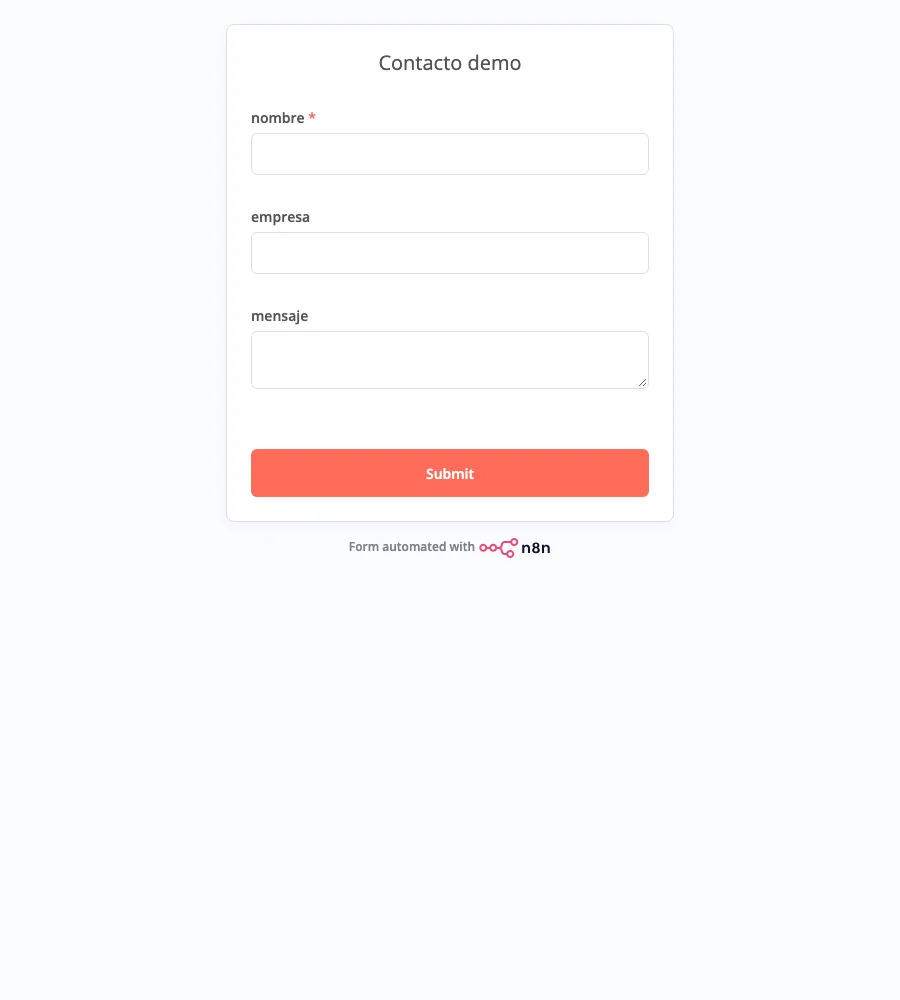
The «Contacto demo» form that n8n served on the test app, 2026-11-27.
Three test submissions returned HTTP 200 in 0.42 to 0.46 s each. The executions took 70 to 195 ms. The agent then checked the database: 3 rows. In total it made 30 calls to the MCP server and read 0 keys.
What that run cost
Weppa charges per app and size, not per execution. Our catalog rule is that, in a billing cycle, an app never costs more than its monthly price. Prorating goes through Stripe.
A Pro app is USD 21 a month on our prices page. Divided by 730 hours, that is about $0.0288 an hour (Lite: 0.0192). The demo used about 0.28 hours, so roughly $0.008. A full day is about $0.69. This is our calculation from the catalog price, not an invoice. We have not checked how the real bill prorates by the hour.
The point is the shape of the cost. On a per-execution plan, a form that gets spammed or a schedule set too tight raises your plan. On a per-instance price, it raises the load on your app instead. We have not load-tested how many executions a Lite or Pro app handles. That limit is real, and it is unmeasured.
One more caveat. Weppa's public n8n page says the recipe is «Not certified». If you plan to run production work on it, weigh that.
Four errors we hit, and the fix for each
None of the pricing guides we read list these. They matter for pricing because each one is time, and time is the hidden cost of any n8n you host yourself. All four came up while the agent ran n8n's CLI inside the container of a running n8n. They come from driving n8n through its command line, as an agent does, not from using the editor.
| # | What we did | Message | Fix that worked |
|---|---|---|---|
| 1 | Ran n8n execute in the container that already runs n8n | «n8n Task Broker's port 5679 is already in use. Do you have another instance of n8n running already?» | Use another port: N8N_RUNNERS_BROKER_PORT=5699 n8n execute … |
| 2 | Ran the Data Table node from the CLI | «Attempted to use Data table node but the module is disabled» | Create the table inside the running n8n: a Data Table «create» node with «Reuse Existing Tables», before the insert |
| 3 | Ran n8n publish:workflow with n8n on | «Note: Changes will not take effect if n8n is running. Please restart n8n». The form returned 404 | Restart the app. n8n came back in about 20 s with «Activated workflow» |
| 4 | Opened /form/e1-contacto | 404: «webhook GET e1-contacto is not registered» | With Form Trigger 2.5 imported as JSON, the registered route was the webhookId, not the path parameter. The form answered at /form/<webhookId> |
Error 4 is the easiest to lose time on. If you import a form workflow from JSON and get a 404, read the webhookId and try that route. The CLI export can come as an array of workflows; this command handles both:
jq -r '(if type=="array" then .[] else . end) | .nodes[] | select(.type=="n8n-nodes-base.formTrigger") | .webhookId' workflow.jsonThen open https://<your-n8n-host>/form/<webhookId>.
Knowing these, the short path is five MCP calls: import and publish in one command, restart, read the webhook route, submit, verify. We have not timed that short path.
The email port trap
The same run tried to send an email with n8n's Send Email node, over SMTP. It failed with «Connection timeout» after about 120 seconds.
A probe from the app explained why. Ports 25, 465 and 587 to smtp.gmail.com, and 587 to smtp.resend.com, gave no answer. HTTPS on 443 went out.
On Weppa today, SMTP mail does not go out from an app. A free Lab only lets TCP 80 and 443 out.
Planned: enabling SMTP mail from apps. Until then, send mail through a provider's HTTPS API.
The lesson goes beyond us. Many hosts and cloud providers restrict SMTP ports. If your workflows send mail, check the ports before you move from n8n Cloud to any server. Or send through an email provider's HTTPS API, which uses port 443.
Count your executions before you pay
The fastest way to choose is to run your real workflow for a while and watch the numbers. A free trial run tells you how often your triggers fire.
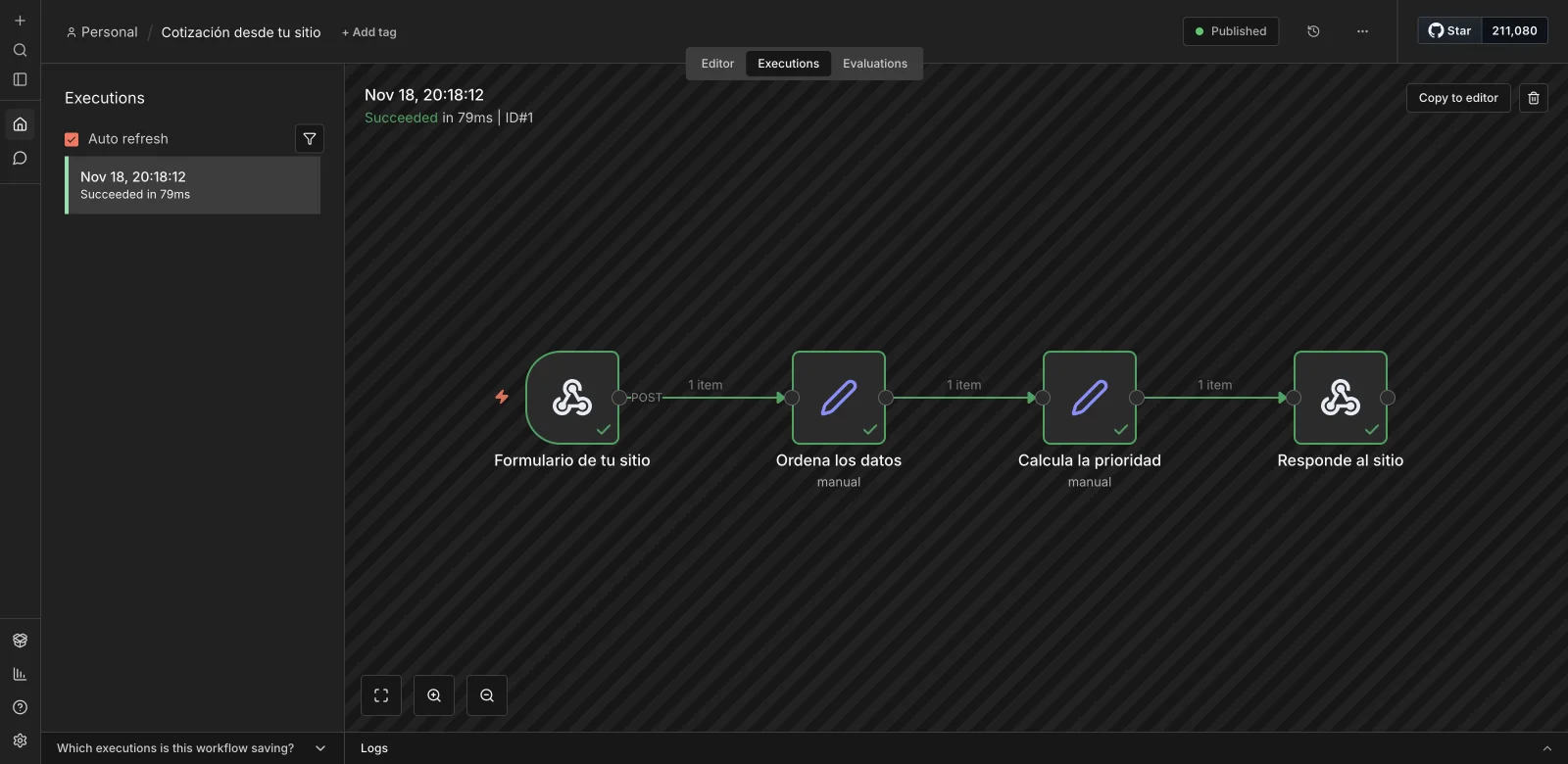
On our demo account, an n8n Lab was ready in 2 min 13 s, and a 4-node workflow ran in 79 ms. A Lab is free and asks for no card. It runs up to 2 hours per session and 10 hours a month, per our prices page. It has no daily backup and is deleted after 14 days without use. That is enough to see your trigger pattern, not to run production.
Is n8n free, and can a company use it for free?
Is n8n free forever? The Community Edition license costs €0, and n8n sets no execution limit on it. The server, the updates and your time are not free. n8n Cloud plans are paid.
Can I use n8n in my company for free? You can self-host the Community Edition at no license cost. Its terms are the Sustainable Use License, not a standard open-source license. Read it before you resell n8n or build a client product on it. When you need SSO or Git environments, you are into Business.
What is the free alternative to n8n? The free route is n8n itself: the Community Edition on your own server. If you came looking for free Zapier alternatives, it is the only option on this page with a €0 license. Free in license, not in hours.
Is n8n still popular? On 2026-11-25, n8n's pricing page showed 212,088 stars on GitHub for the Community Edition. The same day, «n8n» had about 135,000 monthly searches in the US, from our keyword data for this guide.
How hard is n8n to learn? The editor is visual, and a simple form-to-table workflow is three nodes. Running n8n yourself is the harder part. In our timed run, building that workflow took 5 min 21 s, and 4 errors came from the CLI and a self-run instance, not from the editor.
Which one to pick
| Your situation | Best fit | Why |
|---|---|---|
| Event-driven workflows, under 2,500 runs a month, no server skills | n8n Cloud Starter | Cheapest hosted option at that volume, nothing to maintain |
| Up to 10,000 runs a month, or a 5-minute schedule | n8n Cloud Pro | The schedule alone uses most of Starter several times over |
| Volume that keeps growing, or noisy triggers | A flat-price instance (Community on your server, or a hosted app) | Cost stops tracking every run; the limit becomes the machine |
| A developer who likes running servers | Community Edition | €0 license; you pay a server plus your time |
| SSO, Git environments, compliance, many teams | Business or Enterprise | Paid self-hosted tiers; ask about the startup discount |
| Comparing with Zapier pricing | Count runs, not steps | n8n's page says other tools bill per step or task, and n8n bills one execution per full run. We did not read Zapier's pricing for this guide: check its plans there |
If you go self-hosted, budget the hours as well as the server. Updates, backups and mail are where time goes.
Next step
If you are unsure how many executions your workflow will use, run it first. Start a free n8n Lab with the Lab guide, point your real trigger at it for a session, and count the runs. Then compare that number with the table above. If you want the sizes and the current version, the n8n app page has them.